Contents Link to heading
Rain Bird and Me Link to heading
My home automation journey always has its ups and downs. One of my key frustrations was that my Rain Bird irrigation system would never stay connected to my Wi-Fi, and when it did, it would work for a bit, then drop off. This wasn’t the end of the world, though. I only needed to modify the irrigation settings a few times a year for summer and non-summer schedules, plus the occasional manual intervention, if I remembered.
As with anything else in my home, as soon as I got my shoddy connection up, I integrated Rain Bird with Home Assistant (HA). This was easy. There was a native integration in core that allowed me to do the basics: turn on zones and update the rain delay. It was functional enough but left something to be desired for me, due to how I wanted to configure my automations and manage the system. But this point was moot, because after a little set-it-and-forget-it, my connectivity issue took hold again and I couldn’t connect anymore.
For about two years, I never really cared enough to get this fixed. I spent half an hour here and there trying to get it reconnected, and sometimes it would work, but most of the time, the Rain Bird app didn’t want to connect to my Wi-Fi.
A Forum Post Resurfaces Link to heading
Then sometime in the summer, I was on-site with a client and we got onto the topic of Home Assistant, and they mentioned seeing me on the forums. This got me thinking, since the only real thing I’d posted on the HA forums was an enhancement request for the Rain Bird integration. The existing zone-based integration required you to turn on each zone individually, so you would turn on zone 1, then zone 2, and so forth, but the controller could be preprogrammed on the device to run a series of zones consecutively as a program. With the existing HA automations, this needed to be done zone by zone, which could underwater or overwater a zone by about a minute. The bigger issue was that HA had to send multiple messages to the controller. If I could trigger a program from HA, I could send a single message and let the controller do its thing.
Fixing the Connection Link to heading
After that conversation, I couldn’t stop thinking about my troubles with the integration and how to improve it. The first thing I needed to do was resolve the connectivity issue, so I took some time, stepped back, and did some research. While doing that, I decided to remove some of the manual configs I had for the controller in my networking equipment and just create a separate 2.4 GHz network for it.
And magically, all of my problems went away.
UniFi may have been trying to get too cute when I statically mapped the device to a specific AP and network. The device wasn’t using the right band, so I took away the 5 GHz option altogether and everything was up and stayed stable. Had I done it sooner, this small fix would have saved me a lot of headaches, and the time I spent contemplating and researching which controller I was going to replace the Rain Bird with. It was bittersweet, because it took so long but the fix was so easy.
Building It My Way Link to heading
Now that I could see the controller in HA, the next step was figuring out how to make the integration better. The first thing I did was clone the core Rain Bird integration and build a HACS (Home Assistant Community Store) custom component so that I could get something working that I wanted to use. This proved to be a good refresher on what I had learned tinkering with the SPAN Panel a while back.
I was able to get all of the enhancements I wanted added pretty quickly, and it was working perfectly fine. Through building the custom component, I discovered that Home Assistant is friendly to AI development and has documentation to make sure that, if you’re using AI-assisted development, agents and contributors follow the guidelines and requirements that the HA platform and community have set. So I started planning the integration of my HACS enhancements into the mainline core integration and used Claude Code to help along the way.
One Feature at a Time Link to heading
The first big thing I had to do to get into core was to break things down feature by feature. In my lab and dev environment, it’s not a big deal to dump a bunch of code at once with a lot of new bells and whistles. But with public repos, especially those with as many contributors as HA, every little code change goes through scrutiny. So I broke it down into individual features:
- Add buttons to start the programs
- Add diagnostics for better troubleshooting
- Include zone run times in the calendar description
- Add program next run sensors
- Add zone run time sensors
There were some dependencies, and I also didn’t want to flood the requests, so I went ahead and started with adding buttons to start programs, the main issue I’d wanted to fix. With this, I submitted my first pull request (PR) #183013. In that request, I had to defend my code and thoughts, as the reviewers didn’t understand that there was a hard mapping of programs to slots. After addressing that, the code owner called out that the names for the programs were actually stored in the underlying library, and I made a quick fix to update that. Along with this, I found that I needed to open a documentation PR as well so that the external-facing website was also updated, #48335.
Under the Hood Link to heading
In parallel, I submitted an update to add diagnostics. This was due to me running into some issues with debugging the schedule. Before this, when the Rain Bird calendar looked wrong (missing runs, wrong times, wrong programs), the only way to see what the controller reported was to run the pyrainbird library directly from Python. This addition allowed users to go to the integration settings and download the diagnostics to attach the file to a bug report with details like device, sensors, and schedules.
This one happened to be a whole learning process. In my code, I had serialized the data in the integration, but the reviewers (rightly) called out that this should be done in the underlying library rather than in HA. The diagnostics output included a value called config_entry with device info. They also pointed out that this information was redacted anyway and just wasted space, so I removed it completely.
Because I didn’t have enough PRs from this project already, I went ahead and looked into pyrainbird to see how feasible a change to that would be. Once I understood what needed to be done, I made a contribution there and added a Schedule.to_dict() function that was reviewed and merged.
After the updated release of the library, I had to bump the version that HA was using and get that merged before I could update my PR and get the feature accepted. During the bump, I realized how many bump <library> version PRs there were. It started clicking for me that, for a project this large, the ability to track every change was important and the easiest way to do it was as each individual feature was added.
Ironically, after all of the effort and thought put into this saga, this cheap bump will forever be my first approved contribution to HA. It came with this comment from frenck that I wish had been attached to something more substantial, but it’s still the highlight of my journey:
Oh hi there @pavandave 👋
10 out of 10, would review again. Thanks for the pull request!
By the way, congratulations on your first contribution to Home Assistant! Welcome aboard 🎉
../Frenck #183391
With the bump merged, I was able to use to_dict() natively in my diagnostics PR, and it was merged the next day. On top of that, HA has an integration quality scale, and adding the diagnostics feature checked off one more requirement to get the Rain Bird integration closer to Gold tier.
The Rest of the Features Link to heading
The other pull requests were less involved and pretty straightforward. For the calendar update, I added a list of the zones and times to the calendar description to make it more viewer-friendly, and for the next run sensors, the change from my custom component was disabling the sensors by default.
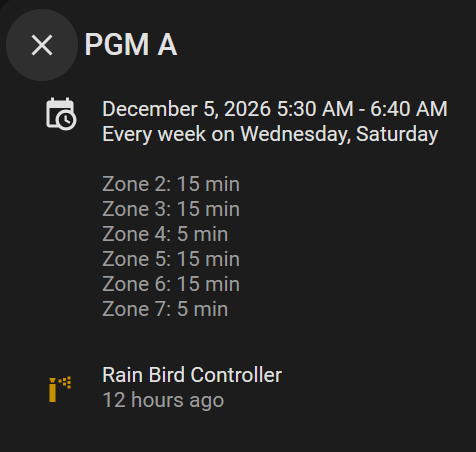
Zone run times in the Rain Bird calendar description.
One thing that slowed things down was that a few of these features depended on another one I was developing at the same time. So each feature had to wait for the one before it to be approved and merged. Through this process, I learned how stacked PRs need to be rebased as the PRs beneath them get approved.
I also had a feature rejected in this process: the zone run time sensors (#183495). HA doesn’t allow entities to be created on the fly, and it was recommended that the end result be achieved via a blueprint. I may create a blueprint in the future and build it on top of the zone run times that are used in the calendar description.
The Final Tally Link to heading
Here’s what it looked like in the end:
tested on my ESP-TM2] --> CORE[Core integration] CORE --> B[Run program buttons] CORE --> D[Diagnostics] CORE --> C[Calendar zone run times] CORE --> N[Program next run sensors] CORE --> Z[Zone run time sensors] B --> B1["core #35;183013
created Sep 24"] B1 --> B1M["merged Sep 30"] B1M --> B2["released in 2026.10"] D --> D1["core #35;183057
created Sep 24"] D1 --> L["pyrainbird #35;629
Schedule.to_dict
created Sep 24"] L --> LM["merged Sep 27"] LM --> L2["released in pyrainbird 6.6.0"] L2 --> V["core #35;183391
bump to 6.6.0
created Sep 28"] V --> VM["merged Sep 28"] VM --> D1M["core #35;183057
merged Sep 29"] D1M --> D2["released in 2026.10"] C --> C1["core #35;183487
created Sep 28"] C1 --> C1M["merged Oct 17"] C1M --> C2["released in 2026.11"] N --> N1["core #35;183489
created Sep 28"] N1 --> N1M["merged Oct 7"] N1M --> N2["released in 2026.11"] Z --> Z1["core #35;183495
created Sep 28"] Z1 --> Z1C["rejected Oct 11
dynamic entities
not allowed"] Z1C --> Z2["create blueprint in future"] click B1 href "https://github.com/home-assistant/core/pull/183013" _blank click D1 href "https://github.com/home-assistant/core/pull/183057" _blank click D1M href "https://github.com/home-assistant/core/pull/183057" _blank click L href "https://github.com/allenporter/pyrainbird/pull/629" _blank click V href "https://github.com/home-assistant/core/pull/183391" _blank click C1 href "https://github.com/home-assistant/core/pull/183487" _blank click N1 href "https://github.com/home-assistant/core/pull/183489" _blank click Z1 href "https://github.com/home-assistant/core/pull/183495" _blank click B2 href "https://www.home-assistant.io/changelogs/core-2026.10" _blank click D2 href "https://www.home-assistant.io/changelogs/core-2026.10" _blank click C2 href "https://www.home-assistant.io/changelogs/core-2026.11" _blank click N2 href "https://www.home-assistant.io/changelogs/core-2026.11" _blank click L2 href "https://github.com/allenporter/pyrainbird/releases/tag/6.6.0" _blank classDef pr fill:#f1f3f5,stroke:#6c757d,color:#000 classDef merged fill:#d4edda,stroke:#28a745,color:#000 classDef released fill:#cfe2ff,stroke:#0d6efd,color:#000 classDef closed fill:#f8d7da,stroke:#dc3545,color:#000 classDef future fill:#e2d9f3,stroke:#6f42c1,color:#000 class B1,D1,L,V,C1,N1,Z1 pr class B1M,LM,VM,D1M,C1M,N1M merged class B2,D2,L2,C2,N2 released class Z1C closed class Z2 future click CORE href "https://github.com/home-assistant/core" _blank
And the final list of PRs:
| PR | What | Docs | Result | Release |
|---|---|---|---|---|
| core #183013 | Run program buttons | #48335 ✅ | ✅ Sep 30 | 2026.10 |
| core #183057 | Diagnostics | — | ✅ Sep 29 | 2026.10 |
| ↳ pyrainbird #629 | to_dict() fix |
— | ✅ Sep 27 | 6.6.0 |
| ↳ core #183391 | pyrainbird bump | — | ✅ Sep 28 | 2026.10 |
| core #183487 | Calendar zone run times | #48508 ✅ | ✅ Oct 17 | 2026.11 |
| core #183489 | Next run sensors | #48509 ✅ | ✅ Oct 7 | 2026.11 |
| core #183495 | Zone run time sensors | #48511 ✖ | ✖ Oct 11 | Blueprint (future) |
Takeaways Link to heading
- No matter how small the feature may be, every new idea needs a separate PR. One feature, one PR.
- Always check the dependencies before making changes. The code owner of both the underlying library and the integration pushed twice for using pyrainbird’s own data: program names and serialization. If something is missing from the library, it may be worth adding it there natively and using it downstream in HA.
- Core has rules, and YOLO HACS development may not always fly. Two of the five features changed shape on the way in because my standards were a bit more flexible than core’s:
- Next run sensors became disabled by default.
- Zone run time sensors were rejected as dynamic entities.
So in the end, I had a conversation that bridged my work and personal lives and made me rethink why I never got my Rain Bird integration working. But that wasn’t enough, so I had to go and build the features the integration didn’t have, and I learned a whole lot along the way. I was introduced to developing in conjunction with others and how code contributions work on GitHub at scale. All of this allowed me to make a larger-scale open source contribution that others can benefit from:
- 2026.10: Users have run program buttons and diagnostics.
- 2026.11: Users have zone run times in the calendar description and the capability to enable next run sensors. These even got a shout-out in the release blog post:
Rain Bird added a next run sensor for each program, a button to sync the controller’s clock, and the zones with their run times in the description of each calendar event. Thanks, @pavandave and @airdrummingfool!
These features that I asked for on the forums long ago now exist, and not just for me. Unfortunately for my free time, this endeavor has also given me the confidence to look at a few other integrations I’ve been itching to improve.